Televisor Kit Build · Volume 4
Making Clips It Can Play
The kit arrives with about twenty-five minutes of material and no way to add more. Sooner or later anyone who owns one wants to see something of their own on it, and the path from an ordinary video file to a 32-line picture on a spinning disc turns out to be short, well documented, and dependent on one small piece of Windows software written by a hobbyist and now preserved only because someone thought to upload it to an archive.
That path is the subject here: the tool, where it actually lives, the workflow the association itself documents, the framing and level decisions that determine whether the result is watchable, and the one mistake that silently ruins a file.
4.1 video2nbtv: Finding the Real Home
The scoping notes for this dive flagged that the commonly cited address for this software — a page on software.informer — is an aggregator’s listing rather than the author’s own site, and asked for the canonical home. Here is what the search established.
The author is Gary Millard. The software converts common video and image files into NBTV wave files that can be played on NBTV equipment. The association’s own documentation refers to it repeatedly and by name: the laser-cut club televisor’s construction guide calls it “Gary Millard’s excellent ‘Video2NBTV’ app” and devotes a chapter to using it.
The author’s own site is gone. The Internet Archive’s copies carry an explicit note from whoever preserved them: “Excellent NBTV software by Gary Millard. Older version. Disappeared off the web.” That is the entire provenance trail — the software was distributed from a personal site, the site went away, and the binaries survive because they were archived.
The canonical home today is therefore the Internet Archive. Two items exist, both added on 11 August 2019, both in the Community Software collection, tagged NBTV, ham, amateur radio and narrow band TV:
Table 1 — The canonical home today is therefore the Internet Archive. Two items exist, both added on 11 August 2019, both in the Community Software collection, tagged NBTV, ham, amateur radio and narrow band TV
| Item | Contents | Size |
|---|---|---|
archive.org/details/video2nbtv | Video2NBTV.exe — described as an older version | 1.8 MB |
archive.org/details/video2nbtvinstallv3 | Video2NBTVInstall-V3.exe — the V3 installer | 970.6 KB |
Neither item carries an explicit licence. Neither includes source code; both are Windows binaries. The software.informer page is a download mirror of the same binaries and is not the author’s.
Two honest caveats on this section. First, the archive items were catalogued from their metadata pages; the software was not installed or run for this volume, so nothing below is a report of first-hand use — the workflow described is the association’s, documented in its own words. Second, this is a Windows executable and the builder’s machine runs Linux, so the practical route is likely to be Wine or a Windows machine, and that has not been tested either. Vol 8 records both as open questions rather than assuming they will be trivial.
4.2 The Workflow, as the Association Documents It
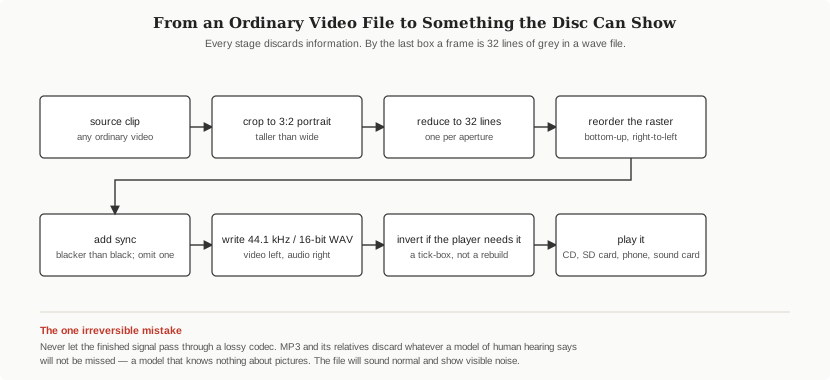
Chapter 11 of the NBTVA’s laser-cut televisor guide, “Obtaining Source Video”, sets out a complete path from a video on the internet to a file a televisor will play. It uses a second, general-purpose tool — the free edition of Any Video Converter — for everything that is not NBTV-specific, and video2nbtv only for the final conversion. The steps:
- Find suitable source material. The guide’s example is a YouTube URL, and it notes TikTok and similar sources equally.
- Download it using Any Video Converter’s Video Download function: add the URL, analyse, start, and the file lands in the application’s download folder.
- Convert it to AVI using the same application’s Format Convert function.
- Convert the AVI to an NBTV wave file in
video2nbtv: select theNBTVandInverted Videooptions in the Format tab, choose the source file, choose a destination, and click Play. The converted file is written ready for playing on the televisor.
The guide adds three refinements that matter more than they look. Clips can be trimmed within Any Video Converter before conversion. They can be cropped to 3:2 with the crop tool — which is the aspect ratio the club standard specifies, and doing it deliberately beats letting the converter decide. And live video can be captured from a webcam within the same application, which is the simplest possible route to seeing a live face on the disc without writing any code at all.
4.3 The Inverted Video Tick-Box, and Why It Is Not Always Right
The single most confusing instruction in that workflow is the one telling the user to tick Inverted Video, and it is worth being precise about it, because following it blindly is as likely to be wrong as right.
The association’s own explanation, from Chapter 1 of the same guide: not all players are consistent with the polarity of the NBTV signal, and polarity matters because the sync-detection circuitry depends on it. In the club’s laser-cut design specifically, files are played from an internal media player module whose output is reversed relative to the club standard — so material destined for that internal player must be inverted when it is converted. The same chapter then says the opposite for the other input: “external NBTV signals feeding the televisor are as per standard club format.”
So the rule is not “always invert”. The rule is:
Invert to compensate for the playback chain, not because the file format requires it. A file played through a chain that inverts needs an inverted file; a file played through a chain that does not, does not.
The symptom of getting it wrong is unmistakable and harmless: the electronics interprets picture as sync and sync as picture, and the result is not a subtly wrong picture but a conspicuously broken one. The remedy is a tick-box and a re-conversion. The association also notes that in a battery-operated set the two incoming signal wires can simply be swapped to invert the signal — an option worth remembering when the source is fixed and the file cannot be re-made.
The kit documented here supplies a further hint about how common this confusion is: its own compact disc is reported by builders to carry material in both polarities. That is a manufacturer quietly acknowledging that the answer depends on the user’s playback equipment.
4.4 Choosing Material That Will Actually Read
Conversion is the easy half. Choosing something worth converting is where most of the disappointment lives, and the constraints follow directly from Vol 3’s numbers.
The frame is portrait, 3:2 height to width. Ordinary video is landscape. Something has to give, and cropping deliberately to a tall frame is far better than squeezing a wide one, which destroys what little horizontal resolution exists.
The resolution is about 32 lines by roughly 50 elements. A wide shot is a grey rectangle. A two-shot is two indistinct blobs. What works is what worked in 1930: one face, close up, filling the frame.
Contrast beats detail. Fine texture is below the resolution floor and simply becomes noise; strong tonal separation between subject and background survives. Material lit flat and evenly reads better than material with deep shadows, because the AC-coupled signal’s floating black level (Vol 3) makes large dark areas behave unpredictably.
Motion is cheap, detail is not. At 12.5 frames per second, movement reads surprisingly well — the eye forgives a low frame rate far more readily than it forgives an unreadable subject. Gesture and silhouette carry; fine action does not.
A builder feeding one of these kits from broadcast television summarised the result better than any specification could: any show that is mostly close-ups, or even waist-up shots, is watchable. Everything else is not.
4.5 Levels, Files and the One Irreversible Mistake
The standard’s recording parameters from Vol 3 apply directly to anything produced by this workflow: 44.1 kHz, stereo, 16 bits per sample, video on the left channel, sound or separate sync on the right, audio recorded at around −10 dB with peaks to −2 dB, and the video channel set so that playback delivers a signal conforming to the video standard.
And then the one rule that cannot be undone after the fact:
Never let an NBTV signal pass through a lossy audio codec. MP3, WMA and every other bit-rate-reduced format works by discarding what a model of human hearing says will not be missed. That model knows nothing about pictures. The file will sound entirely normal and will show visible noise and distortion on the disc.
This is not a tuning issue to be compensated for later. Once a wave file has been through a lossy encoder, the information is gone. Keep the .WAV. If a file must be moved through a service or a device that re-encodes audio — a messaging app, a video platform, a Bluetooth link — assume it has been destroyed as a television signal and re-convert from the original.
That last case deserves a specific warning, because it is a modern trap the association’s older documentation predates: Bluetooth audio is lossy. The club’s newer laser-cut design explicitly offers Bluetooth as a way to play files from a phone, which is convenient, but a Bluetooth link applies its own bit-rate reduction to whatever passes through it. A wired connection from a line output is the reliable path.
4.6 Where to Get Known-Good Material
Before converting anything, it is worth having a file that is known to be correct, so that a failure can be attributed to the kit rather than to the conversion. Three sources:
The kit’s own CD. Approximately twenty-five minutes of 32-line NBTV video to club standard, and the obvious first test — but note that it is an ordinary audio CD, to be played in a CD player, not a data disc.
The association’s twelve-second demonstration file. The NBTVA publishes a page on “the sound of NBTV” carrying a short demonstration whose content it lists shot by shot: one second of video black, a one-second fade to the first picture, then two seconds each of a test chart with large NBTV lettering, a grey test chart with a circle (the Grant Dixon test pattern), an NBTV-and-disc logo and a BBC eye caption, a one-second fade, and a final second of black. The page offers an MP3 version to listen to and — importantly — a separate zipped copy of the original wave file, with the explicit warning that the MP3 is fine for listening and not good enough to use as a video signal. The association suggests copying and pasting the wave file repeatedly in an audio editor to make a longer loop for bench work, which is exactly what commissioning needs.
The club CDs themselves, available through the association’s club shop, including material specifically intended for checking a newly finished monitor’s focus, framing and synchronisation.
One item could not be confirmed. The association’s news page states that the files from this kit’s own disc “can be downloaded in .wav format freely from this website”, and links to a directory for them. That directory returned HTTP 404 to this research pass, as did several likely variants of its address, so the current download location for those files could not be established and no working link is given here. It may have moved, or the listing may simply be disabled. The association’s contact page is the place to ask.
4.7 Cross-References
- The signal parameters every conversion has to hit — raster order, levels, sync, bandwidth, media recommendations: Vol 3.
- Generating a signal directly rather than converting a file, and driving the kit live: Vol 5.
- A published build that generated the signal from a running video game rather than from a file: Vol 6.
- Why a polarity error produces the specific symptoms it does: Vol 2, on sync separation.
- The commissioning sequence in which a known-good file is used to prove the machine before any home-made clip is trusted: Vol 8.
Comments (0)